 DVD Tamer
Never look up another episode name.
DVD Tamer turns your DVDs into files that are already named and filed for your media server. It reads the disc's own menus, looks the show or movie up online, and puts every episode in the right order with its real title, so you don't have to.
And the disc's menus come along, as an Open Video Menu, so your rips can open on the menu just like the DVD did.
Free for Windows and Linux. Works with unencrypted DVD-Video: ISO files and VIDEO_TS folders.
Other rippers
title_t00.mkv   2:12:40
title_t01.mkv   0:44:12
title_t02.mkv   0:44:09
title_t03.mkv   0:43:51
title_t04.mkv   0:06:18   ← which one is this?
DVD Tamer
TV Shows/Harbor Lights (1998)/
  Harbor Lights (1998) - Season 01 - Disc 1.ovmz
  Season 01/
    Harbor Lights (1998) - s01e01 - Pilot.mkv
    Harbor Lights (1998) - s01e02 - The Night Ferry.mkv
    Harbor Lights (1998) - s01e03 - Fog Warning.mkv
  Behind The Scenes/
    Making Harbor Lights.mkv
An illustration. The play-all title isn't ripped twice: it's the same video as the episodes.
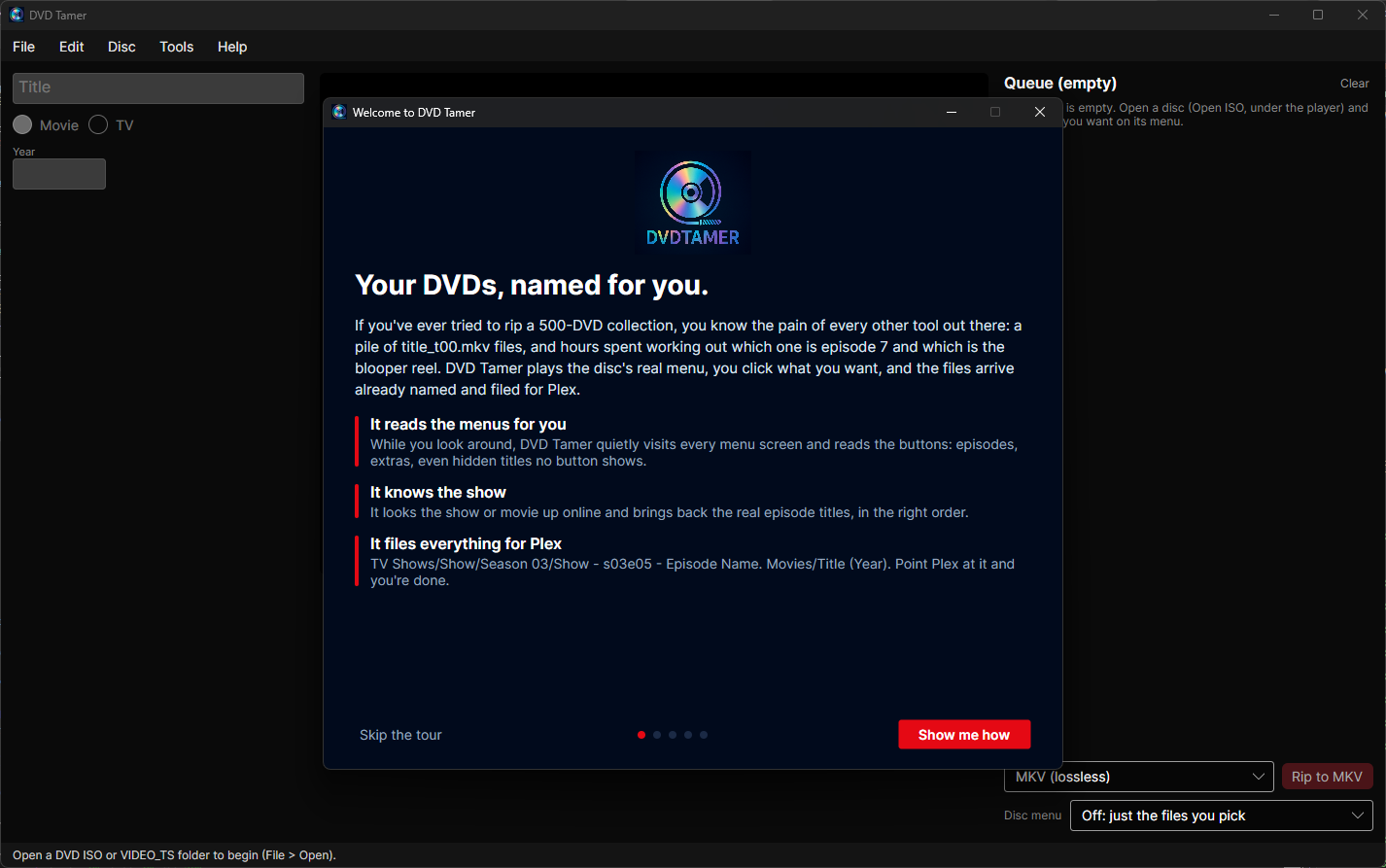
Three steps. That's the whole app.
-
Open a disc
Drop an ISO or a VIDEO_TS folder on the window. The disc's real menu starts playing, and DVD Tamer starts reading it in the background.
-
Click what you want
Click buttons right on the menu, like a remote. Each click queues what that button plays. Or press Queue Likely Items: the feature and its extras, or every episode.
-
Rip
Pick lossless MKV, a built-in MP4 or one of your HandBrake presets, and press Rip. The files land in your library folders, named. Scan the library and you're done.
Names you don't have to look up
Ripping a DVD is easy. Working out which file is episode 7, what it's called, and which one is the blooper reel is what takes the hours. DVD Tamer was made to do that part for you, for a whole collection, not one disc at a time.
It reads the menus
While you look around, DVD Tamer quietly visits every menu screen in a hidden second player and reads the buttons: episode titles, extras, scene names. The names come from the disc itself.
It knows the show
It confirms the title and year on TheTVDB, TMDb and TVmaze, and brings back the real episode list. Built in: no accounts, no API keys, nothing to set up.
It numbers the episodes
Episodes are matched to the season by their on-screen names, so each disc starts at the right episode. A play-all title with no separate episodes is split at its episode chapters.
It sorts the extras
Featurettes, deleted scenes, trailers and interviews go in the folders your server expects, typed from their names or from the menu page they sit on. A bonus film on a TV disc isn't numbered as an episode.
It finds what's hidden
DVD Tamer reads the disc's programming, so it knows every title, including easter eggs no visible button shows and titles no menu plays at all. You can queue all of them.
It handles the odd ones
Specials filed in Season 00. A film split over two discs as pt1 and pt2. Widescreen and fullscreen as two versions of one movie. A feature-length finale as its episode.
You stay in charge
- Anything worth a second look is marked with a small ? in the queue, and Rip shows you those items first, each with a ▶ to play it.
- Wrong episode? Pick the right one from the season's list, and the ones after it follow along. Type a name and it sticks.
- Wrong show? Choose the catalogue match yourself, or search. ↺ puts anything back to automatic.
- Ripping waits only for the menus that can still change a queued name, then starts. Or stop the reading and rip with the names so far.
Laid out the way your server expects
Pick a preset in Preferences, or write your own templates. You can also put files straight into a folder of your choosing.
| Preset | Movie | Episode |
|---|---|---|
| Plex (default) | Movies/Title (Year)/Title (Year).mkv | TV Shows/Show (Year)/Season 01/Show (Year) - s01e05 - Name.mkv |
| Plex, with catalogue IDs | Title (Year) {tmdb-603}/… | Show (Year) {tvdb-71256}/Season 01/… |
| Jellyfin | Title (Year) [tmdbid-603]/… | Show (Year) [tvdbid-71256]/Season 01/Show - S01E05 - Name.mkv |
| Emby | Title (Year) [tmdbid=603]/… | Show (Year) [tvdbid=71256]/Season 01/Show - S01E05 - Name.mkv |
| Kodi | Title (Year)/…, every extra in one Extras folder | Show (Year)/Season 01/Show S01E05 - Name.mkv |
| Custom | Templates with {Title}, {Year}, {Season:00}, {TvdbId}… and a live example as you type | |
Your files, your format
Choose next to the Rip button, per rip.
MKV, lossless
Exactly what's on the disc: every audio track and subtitle in the disc's order and languages, chapters, and closed captions as text. DVD Tamer reads the disc itself, the way a player does; no MakeMKV.
Your HandBrake presets
Use the presets you already trust. DVD Tamer imports them from the HandBrake app, and HandBrake reads the disc directly, with no temporary copy.
MP4, built in
A good all-round MP4 made with ffmpeg (H.264), with the audio kept where MP4 can hold it and captions included.
Made for a whole collection
A queue of discs
Open the next disc while the last one is still being read. Each disc keeps its own names and destination, and Rip runs them one after another.
Network shares
Discs and libraries on a NAS work. Turn on work on a local copy and menus read in seconds instead of minutes, with files copied over when they're done.
Difficult discs
Damaged sectors and unusual authoring are handled, and DVD Tamer tells you when a file needed it, instead of silently writing a short rip.
Just the DVD
DVD Tamer works with unencrypted DVD-Video, as ISO files or VIDEO_TS folders. It doesn't do Blu-ray.